
1099-DA Crypto Taxes Explained: How to Fix Exchange Errors Using Form 8949
By Clinton Donnelly, CEO, Founder | CryptoTaxAudit
You got a 1099-DA in the mail. Now what?
It means an exchange reported your sales or trades to the IRS. But here is the thing.
That 1099-DA is not the whole picture of your trading activity. This is the first year exchanges have issued them.
Every exchange is making them look different. And they are confusing.
Worse, the numbers on your 1099-DA may be flat-out wrong.
This guide walks you through exactly what a 1099-DA is, why it can mislead you and the IRS, and how to correct it using Form 8949. Step by step.
What Is a 1099-DA?
A 1099-DA is a tax form that crypto exchanges send to you and the IRS. It lists certain sales or exchanges you made during the year.
The form has columns showing what you sold or exchanged, the dates you bought and sold it, and the prices at which you bought and sold it.
But here is the catch for 2025 tax returns. This year, exchanges are not sending the cost basis or total gain columns to the IRS. Only the proceeds. The IRS will not get your cost basis numbers or the gain/loss column.
That is misleading to a lot of people.
Why Are the 1099-DA Numbers Wrong?
The rules that exchanges follow to report your trades are different from the rules you follow to file your taxes.
Here is the specific problem. When you transfer a crypto asset into an exchange, the exchange does not know when you originally bought it.
Under Treasury Regulation 1.6045-1(d), the exchange is told to assume it received that asset on the date of the transfer.
So the exchange treats the transfer date as your acquisition date. But you probably bought that asset months or even years before that.
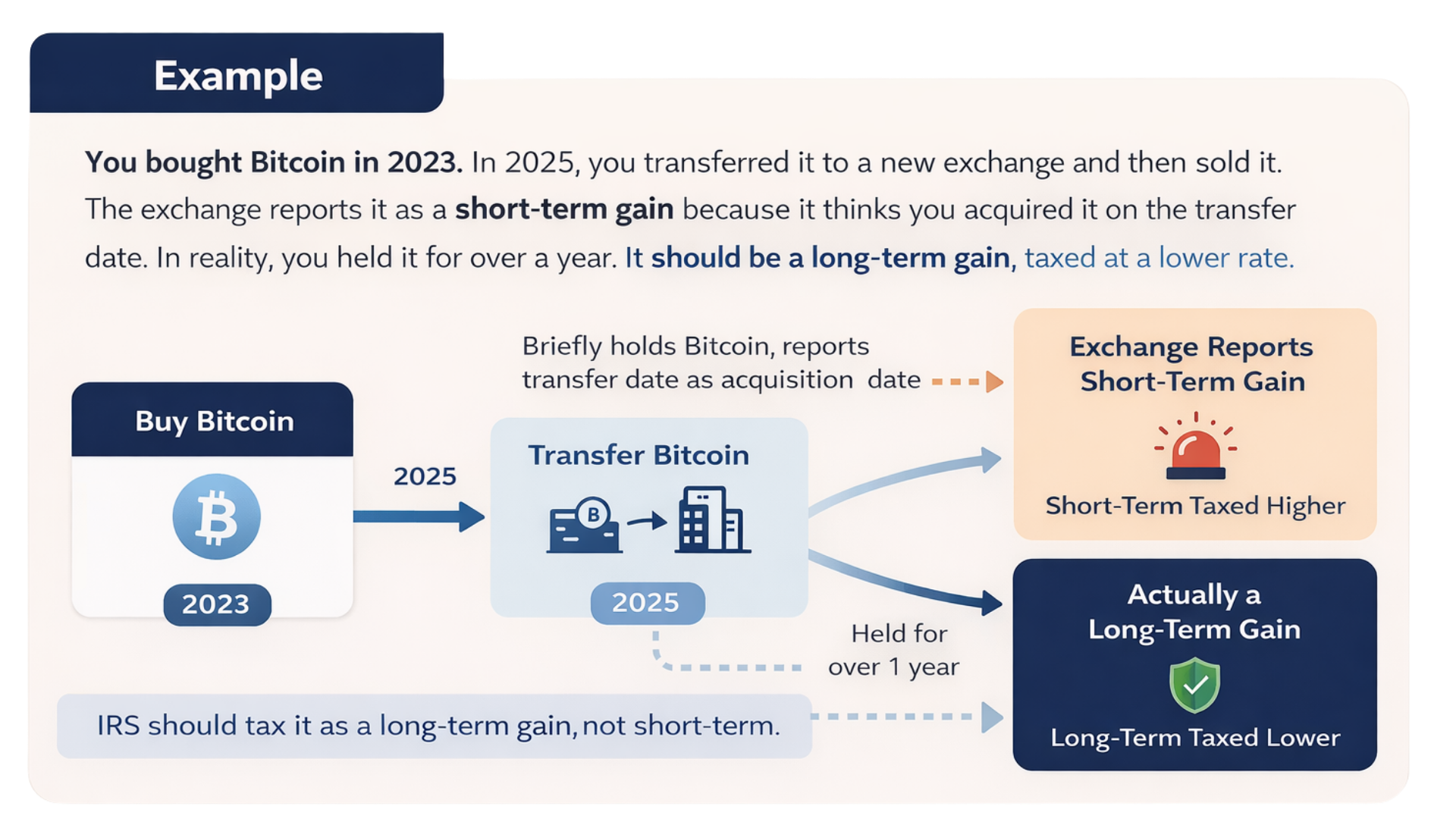
Example: You bought Bitcoin in 2023. In 2025, you transferred it to a new exchange and then sold it. The exchange reports it as a short-term gain because it uses the transfer date as the acquisition date. In reality, you held it for over a year, so it should be treated as a long-term gain taxed at a lower rate.
This is why crypto tax software companies that say they will match your trades to the 1099-DA are going down the wrong path. The 1099-DA is not the final answer. Even the IRS does not assume the 1099-DA is correct.
Can You Just Ignore the 1099-DA?
No. You should not ignore it.
The IRS expects you to account for every 1099 they know about. When your tax return gets sent to the IRS electronically, the IRS checks to see if you reported everything that was reported to them.
If you skip the 1099-DA, you are asking for trouble.
You have to report it. But you also have to correct it. And you do that on Form 8949.
What Is Form 8949?
Form 8949 is called Sales and Other Dispositions of Capital Assets. It looks like a spreadsheet. This is where you report every crypto sale or exchange.
In each row, you enter what you sold, the dates you bought and sold it, the proceeds, the cost basis, any adjustments, and the net gain or loss.
Page 1 is for short-term gains. These are assets you held for one year or less.
Page 2 is for long-term gains. These are assets you held for more than one year. You can have as many pages of each type as you need.
Some people list every single trade on individual line items. Others enter just the bottom-line totals from all their trading activity.
The IRS accepts it either way.
All your Form 8949 pages get totaled up and flow onto Schedule D. That is where your bottom-line capital gains numbers go on your tax return.
How Do You Fix the 1099-DA on Form 8949?
This is the core of it. You need to do two things on Form 8949:
First, zero out the wrong numbers from the 1099-DA.
Second, enter your correct capital gains as calculated by your crypto tax software.
Here is exactly how to do it.
Step 1: Check the Correct Reporting Box
At the top of Form 8949, there is a row of checkboxes. You must check one box to indicate whether cost basis was reported to the IRS on a 1099.
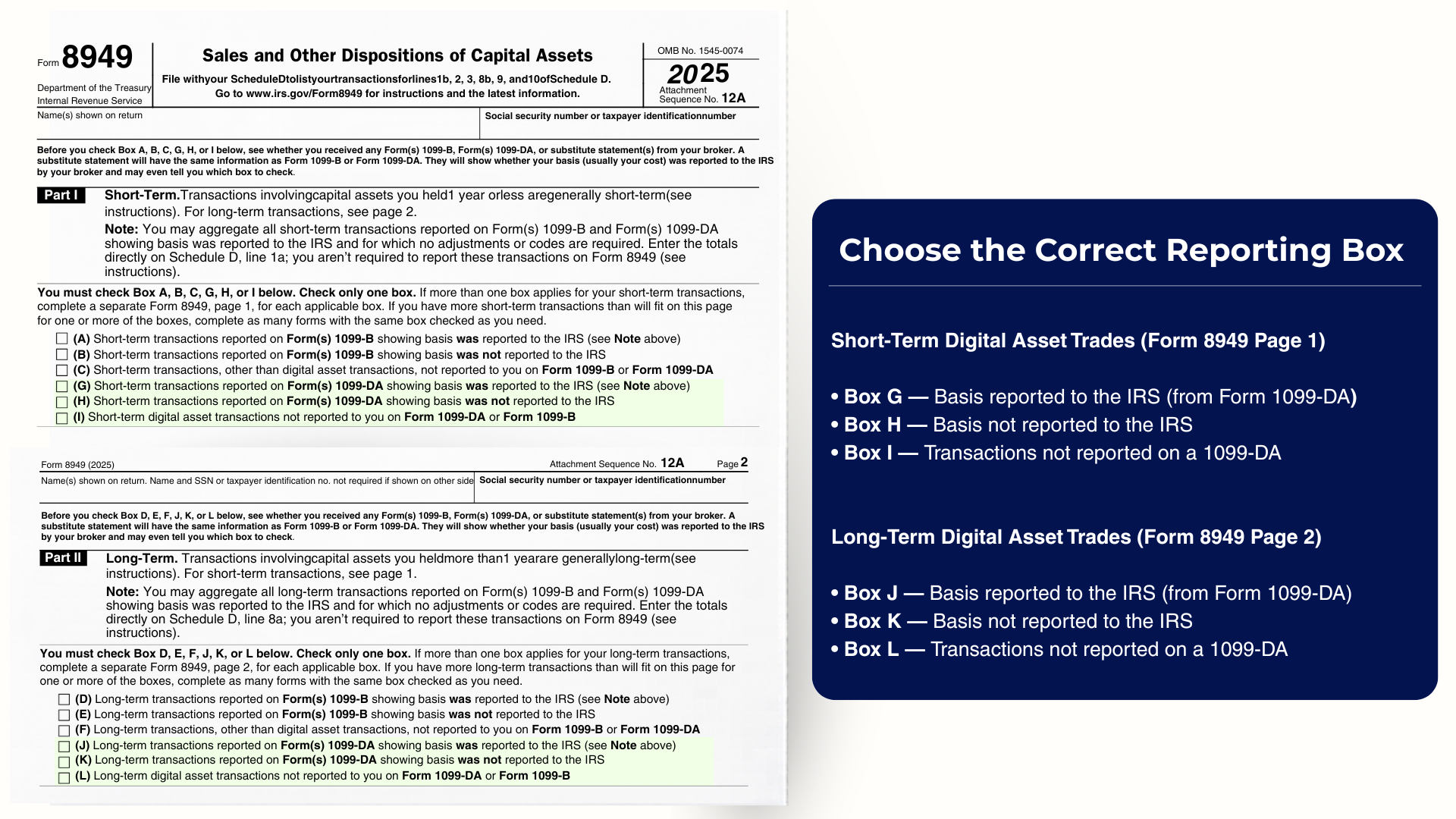
Choose the correct reporting box on Form 8949 based on whether the trade is short-term or long-term, and whether basis was reported to the IRS on Form 1099-DA.
For short-term digital asset trades, the boxes are G, H, or I. For long-term trades, the boxes are J, K, or L.
This year, for your 2025 taxes filed in 2026, most crypto traders will check Box I (short-term) or Box L (long-term).
Why? Because no cost basis is being reported to the IRS on the 1099-DA this year.
Your 1099-DA will tell you whether the transactions are short-term or long-term and whether cost basis was reported. Check the matching box.
In future years, this will change. Some cost basis will be reported, so you will need to check the appropriate box at that time.
Step 2: Zero Out the 1099-DA Numbers
On the first line of the grid, enter the 1099-DA information and then subtract it out. Here is what each column looks like:
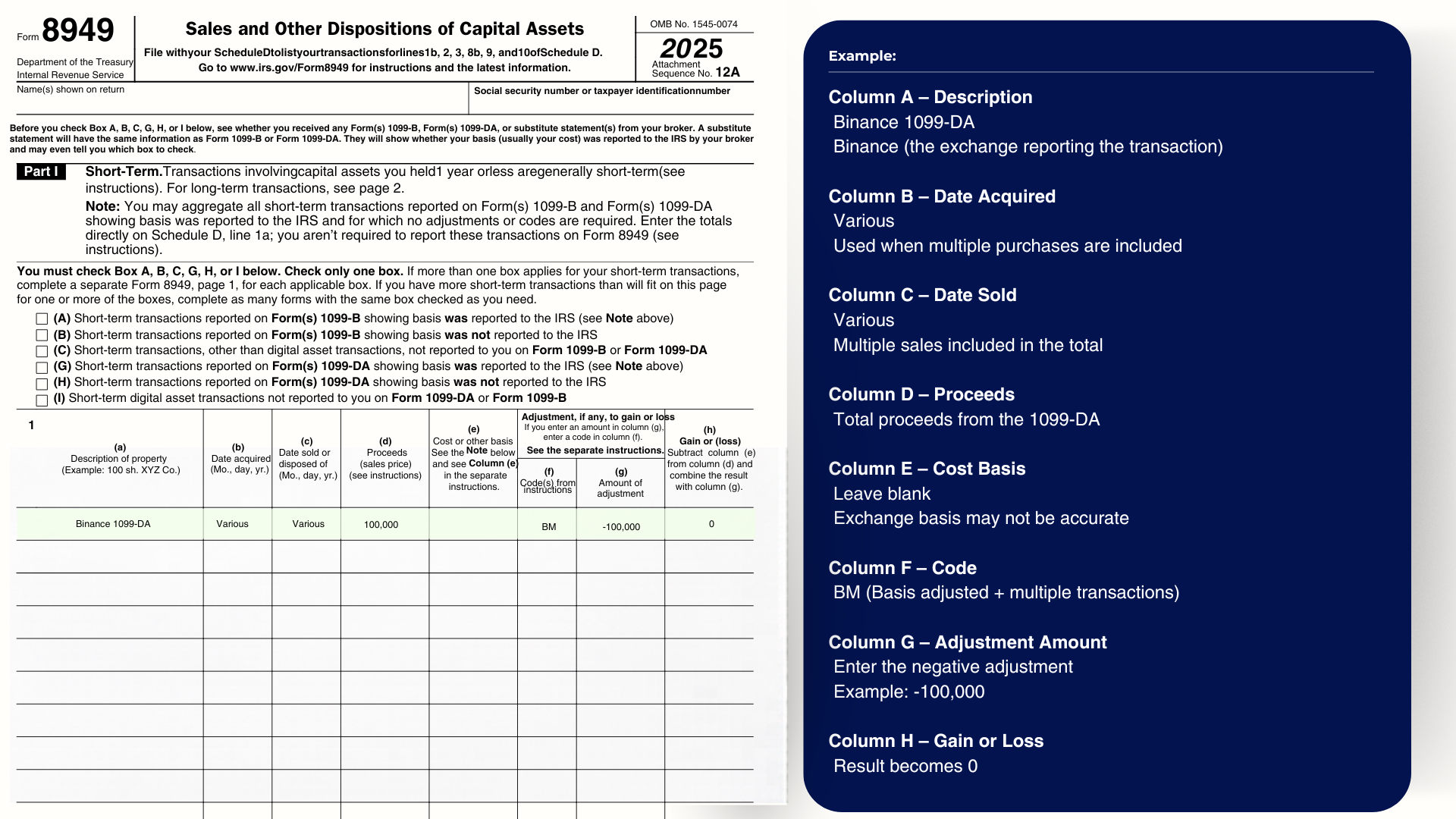
Line 1: Enter the 1099-DA amounts and zero them out with a negative adjustment.
Step 2 Breakdown: How to remove incorrect 1099-DA data
Column A (Description): Write the exchange name and 1099-DA. For example, "Binance 1099-DA."
Column B (Date Acquired): Write "Various." This is standard when multiple purchases are included in the total.
Column C (Date Sold): Write "Various." Multiple sales are included in the total.
Column D (Proceeds): Enter the total proceeds from the 1099-DA for that asset type.
Column E (Cost Basis): Leave blank. The exchange may not have accurate cost basis, and it is not being reported to the IRS this year.
Column F (Code): Enter "BM." B means the basis was adjusted. M means the line summarizes multiple transactions.
Column G (Adjustment Amount): Enter the negative of the proceeds. If the 1099-DA reported $100,000 in proceeds, enter -$100,000 here.
Column H (Gain or Loss): The result is zero. You have effectively zeroed out the 1099-DA line.
This step accounts for the 1099-DA so the IRS sees you reported it. But it removes the wrong numbers so they do not affect your taxes.
Step 3: Enter Your Correct Capital Gains
On the next line, you enter the actual capital gains you calculated using crypto tax software like Koinly, CoinLedger, or CoinTracking.
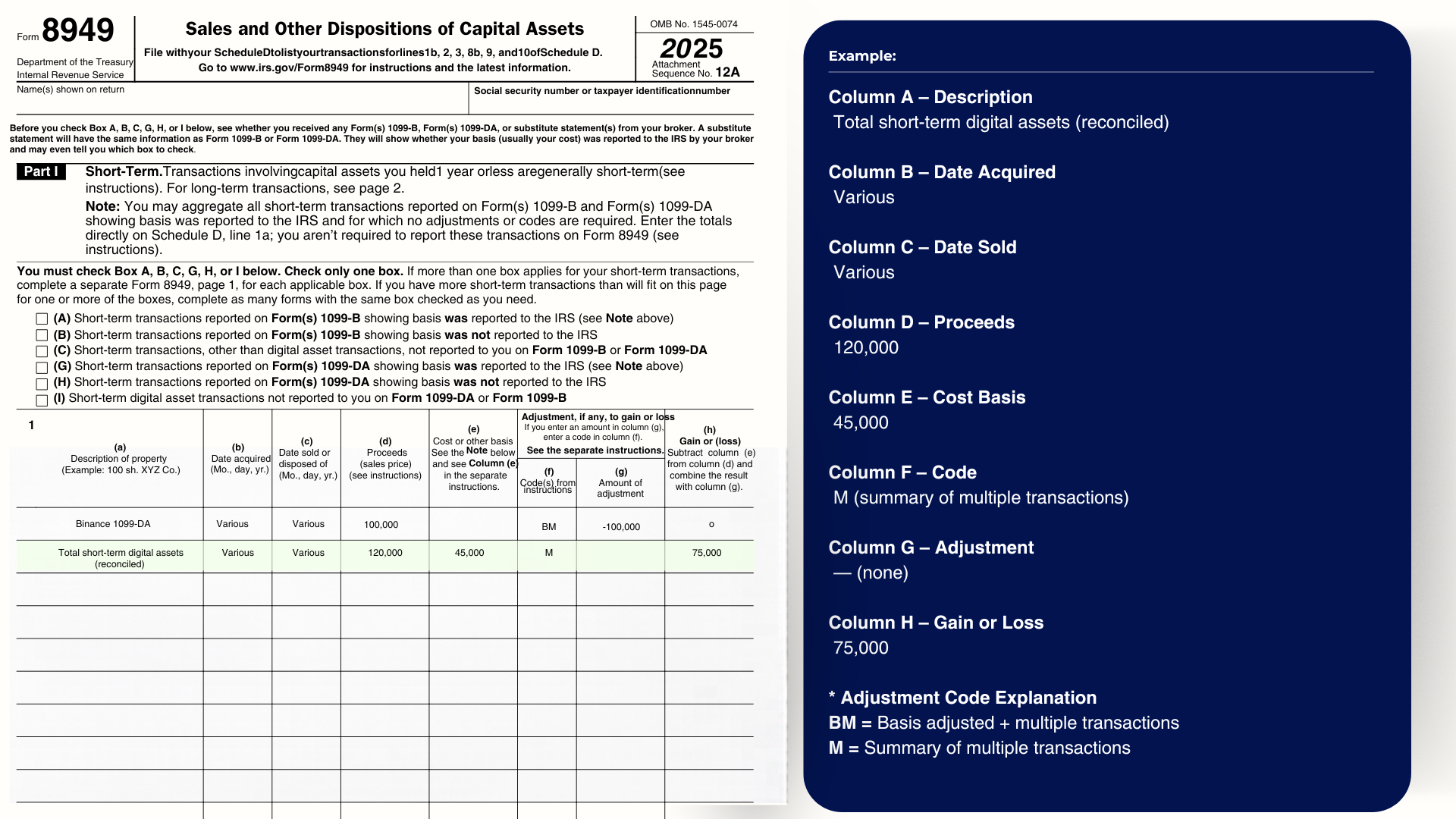
Line 2: Enter your actual calculated capital gains totals.
Step 3 Breakdown: How to report your actual crypto gains
Column A (Description): Write "Total short-term digital assets (reconciled)" or "Total long-term digital assets (reconciled)."
Columns B and C (Dates): Write "Various."
Column D (Proceeds): Enter your total proceeds as calculated by your crypto tax software.
Column E (Cost Basis): Enter your total cost basis as calculated by your crypto tax software.
Column F (Code): Enter "M" for summary of multiple transactions.
Column G (Adjustment): None needed on this line.
Column H (Gain or Loss): This shows your actual capital gain or loss.
That is how you replace the wrong 1099-DA numbers with the right ones. You account for the 1099-DA and you report your correct gains. Both on the same form.
|
Need help calculating your crypto gains? CryptoTaxAudit offers Full Service Crypto Gain Calculation. We handle the math so you can file with confidence. Talk to us. |
Why Does Long-Term vs. Short-Term Matter?
In the U.S., long-term capital gains are taxed at a lower rate than short-term gains. Long-term means you held the asset for more than 365 days.
This is a big deal when it comes to 1099-DAs. If the exchange reports your gain as short-term when it should be long-term, you could end up paying more tax than you owe.
If the 1099-DA does not look right to you, do not report it that way. You have to account for it on your tax return, but you correct it on Form 8949. That is the whole point of this process.
Where Does Form 8949 Go on Your Tax Return?
All your Form 8949 pages get totaled and carried over to Schedule D. Schedule D is where your bottom-line capital gains numbers are calculated on your tax return.
Short-term totals go to one section. Long-term totals go to another. Schedule D combines them to give you your total capital gains tax.
Do You Need Crypto Tax Software?
If you just plug the 1099-DA numbers straight into your tax software, it is going to look like you made a fortune.
That is because the cost basis is missing. Without cost basis, it is all profit as far as the software knows.
You need crypto tax software to calculate your actual cost basis and gains.
Platforms like Koinly, CoinLedger, and CoinTracking can pull in your transaction history and do the math.
Then you take those numbers and enter them on Form 8949 as shown above.
If the whole thing feels overwhelming, that is normal. It is the first year of 1099-DAs and the rules are new for everyone.
|
Not sure if your 1099-DA is right? Worried about an IRS notice? TaxShield monitors your IRS account and gives you full audit defense if the IRS comes knocking. Learn about TaxShield. |
The Bottom Line
Your 1099-DA is a starting point, not the final answer. The exchange is doing its best with limited information.
But you know your actual trading history better than the exchange does.
Use crypto tax software to calculate your real gains. Report them on Form 8949. Zero out the wrong 1099-DA numbers. Enter the correct ones. Let it all flow to Schedule D.
Good luck with your taxes this year. And if the numbers on your 1099-DA do not look right, do not just file them that way. Fix them on Form 8949.
This content is for educational purposes only and does not constitute tax advice. Consult a qualified tax professional for advice specific to your situation.
Related Articles: IRS Form 1099-DA: Complete Guide for Crypto Traders
Author